Your AI Credits.
Always Visible.
Real-time quota monitoring for Antigravity IDE. Zero telemetry. Zero external calls. Everything stays on your machine.
Everything you need to stay in control
Monitor your quota, manage cache, and let the agent run hands-free — all from a single sidebar panel.
Real-Time Dashboard
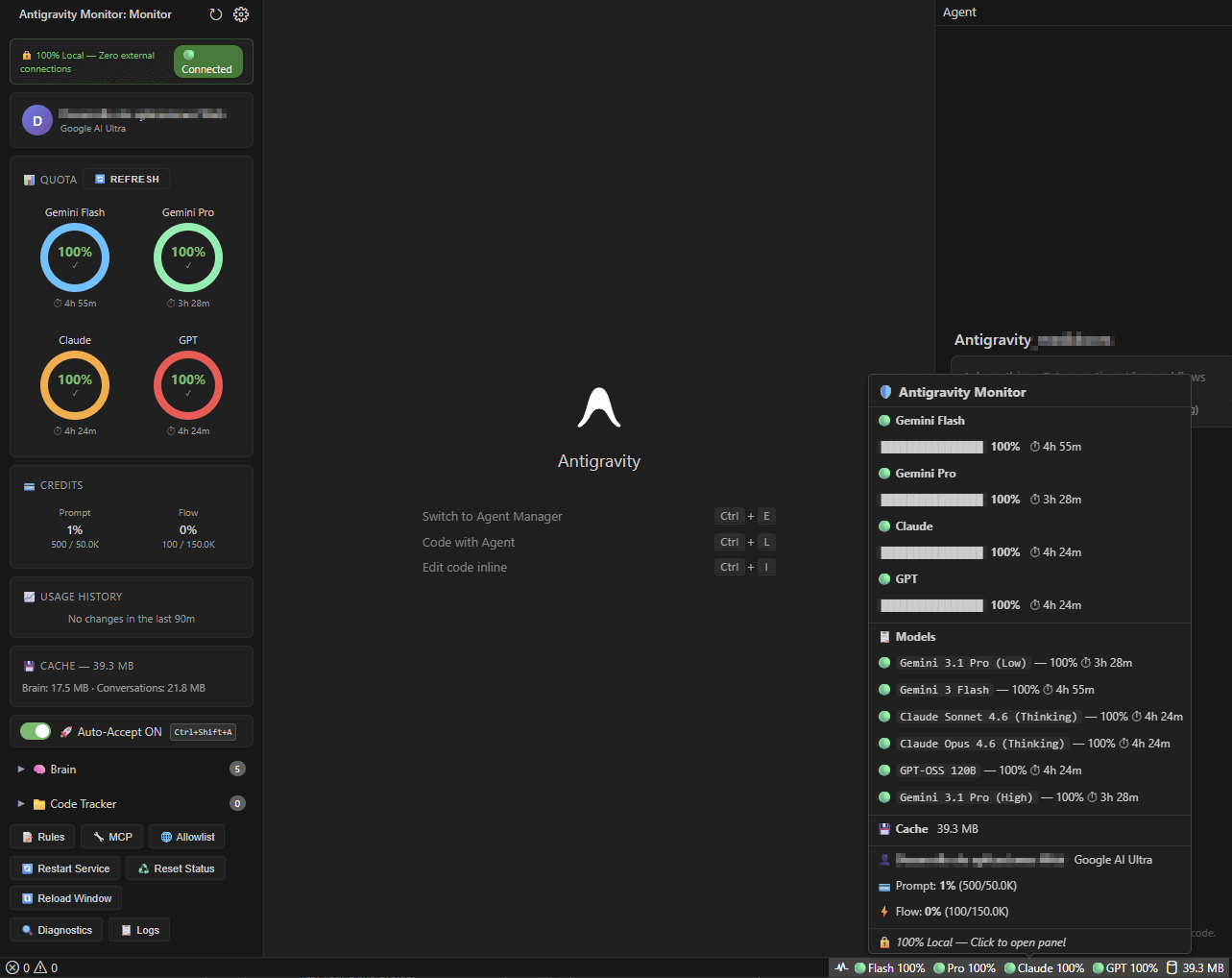
Live circular gauges showing remaining credits with color-coded indicators. Auto-refresh every 90 seconds. Notifications at 30% and 10% thresholds.
Usage Analytics
SVG sparkline with Prompt and Flow credit tracking. Session consumption summary with 7-day history retention.
Intelligent Auto-Accept
8 VS Code commands, 7 auto-execution policies, and native OS automation with configurable accept/reject keywords. Fully hands-free.
Cache Manager
View brain tasks, conversations, and code contexts. One-click or auto-clean with configurable keep count. Size warnings at 500 MB.
Live Config Editor
Edit commands, keywords, settings, and intervals directly from the sidebar. Changes apply instantly.
Credit Tracking
Prompt and Flow credit monitoring with percentage breakdowns and monthly usage comparison.
Status Bar
Always-visible quota summary in your editor's bottom bar. See Flash, Pro, Claude, and GPT percentages at a glance. Click to open QuickPick with full details.
Zero Configuration
Install and it just works. Connects to your local Antigravity instance automatically — no API keys, no URLs, no manual setup required.
12+ Models Tracked
Individual monitoring for Claude Sonnet, Opus, Gemini Flash, Pro, GPT-OSS and more. Grouped by provider with per-model detail view.
Your data never leaves your machine
Antigravity Monitor communicates exclusively with 127.0.0.1. It reads quota data from your local Antigravity language server — nothing else.
No analytics. No tracking. No telemetry. Every byte stays local. CSP nonce protection and full input sanitization included.
Works everywhere
Native auto-clicker on Windows. CDP-based automation on macOS and Linux.
Windows
Native UI Automation — works out of the box
macOS
CDP via WebSocket — launch with --remote-debugging-port=9000
Linux
CDP via WebSocket — launch with --remote-debugging-port=9000
Install in seconds
Download the VSIX and install it directly in your editor.
Download
Get the latest .vsix from GitHub Releases
Install
Extensions → ... → Install from VSIX
Done
Find the monitor icon in your Activity Bar
Ready to take control?
Join developers who monitor their AI credits in real-time, locally and securely.